친구와 만나기로 했는데, 어디서 만날지 정하는게 어려웠다.
서로 조금이라도 더 본인에게 가까운 곳에서 보려고 했기 때문이다.
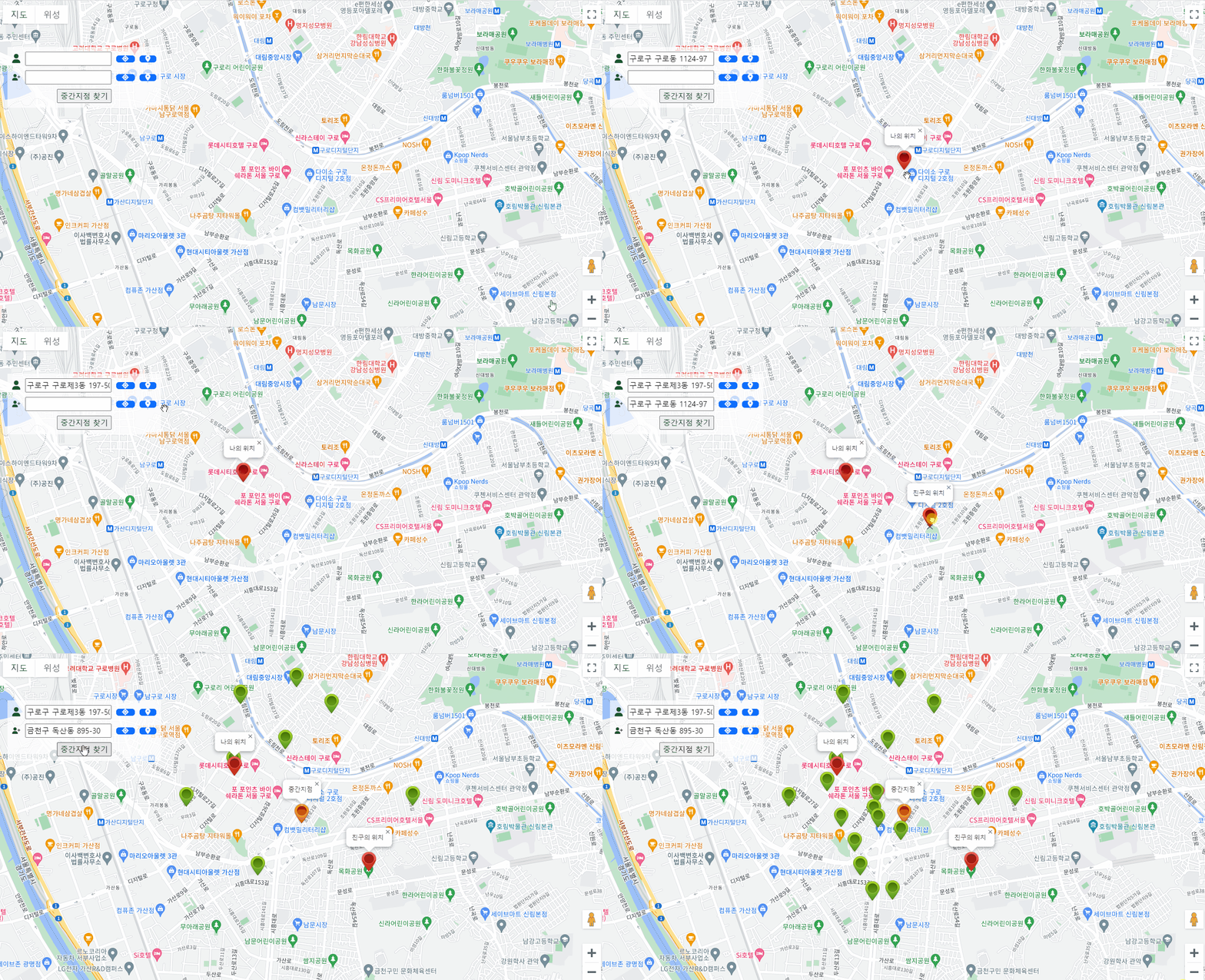
두 사람의 중간 위치가 어디지? 라는 생각에 간단하게 중간지점 찾는 코드를 만들어보았다.
이때, 사용한 개념들을 정리해보려고 한다.
먼저 첫번째로 (리버스) 지오코딩이다. 좌표값만 보면 사용자는 정확히 어디 위치인지 모른다. (리버스) 지오코딩을 사용하여 내가 선택한 위치의 주소값을 불러와 주었다.

지오코딩(Geocoding):
주소나 장소명과 같은 인간이 이해하는 위치 정보를 지리적 좌표(주로 위도와 경도)로 변환하는 프로세스
ex) "서울시 강남구 역삼동"라는 주소를 입력하면 해당 주소의 지리적 좌표가 반환되어 지도 상에 표시됨
리버스 지오코딩(Reverse Geocoding):
지리적 좌표(위도와 경도)를 입력받아 해당 위치의 주소나 장소 정보를 찾는 프로세스. 즉, 좌표를 입력하면 그 위치의 주소를 반환
ex) (37.xxxx, 126.xxxx)라는 경위도 좌표를 입력하면 "서울시 OO구 OO동"이 반환
각각 알고리즘을 이해하기 쉽게 파이썬 코드로 예시를 들어본다면 아래와 같다.
def geocoding(address):
    coordinates = {
        '서울': {'latitude': 37.5665, 'longitude': 126.9780},
        '파리': {'latitude': 48.8566, 'longitude': 2.3522},
        '뉴욕': {'latitude': 40.7128, 'longitude': -74.0060},
		...
    }

    return coordinates.get(address, None)

// ex. geocoding('서울')의 결과는 {'latitude': 37.5665, 'longitude': 126.9780}...


def reverseGeocoding(latitude, longitude):
    locations = {
        (37.5665, 126.9780): '서울',
        (48.8566, 2.3522): '파리',
        (40.7128, -74.0060): '뉴욕',
        ...
    }

    return locations.get((latitude, longitude), None)

// ex. reverseGeocoding(37.5665, 126.9780)의 결과는 '서울'...
그러나 지오코딩과 리버스 지오코딩을 위한 데이터는 방대하며, 고도의 정확성을 요구하는 경우 엄청난 양의 지리 정보 데이터를 수집, 정제, 유지보수해야 하기 때문에 당연히 실제로는 이렇게 개발하지 않는다.
대형 기업이나 지도 서비스 제공자들이 전 세계의 지리 정보를 수집하고 유지보수한다. 전 세계의 도로, 건물, 주소, 지형 정보 등을 데이터베이스에 보유하고, 이를 기반으로 정확한 지오코딩과 리버스 지오코딩 서비스를 제공한다.
따라서, 이러한 서비스가 필요한 경우에는 외부의 지도 서비스 API를 활용하는 것이 일반적이다. (ex. Google Maps Geocoding API 등...)
나도, 이러한 API(구글맵 API)를 통해 지오코딩과 리버스 지오코딩 서비스를 활용해보았다. (자바스크립트 코드)
    // 현재 지도의 중심 좌표를 가져옴
    var center = map.getCenter();

    // 중심에 마커를 생성하고 지도에 표시
    var marker = new google.maps.Marker({
        position: center,
        map: map,
        icon: 'resources/img/poi_1.png',
        draggable: true
    });

    // 마커 보여주기
    var infowindow = new google.maps.InfoWindow();
    infowindow.open(map, marker);

    // 마커를 드래그할 때 발생하는 이벤트 리스너
    google.maps.event.addListener(marker, 'dragend', function () {
        // 마커가 이동될 때 리버스 지오코딩을 통해 주소를 가져옴
        geocoder.geocode({ 'location': marker.getPosition() }, function (results, status) {
            if (status === 'OK') {
            	var crdntTextBox = element.parentElement.getElementsByClassName("crdntTextBox")
                crdntTextBox[0].value = JSON.stringify([marker.getPosition().lat(), marker.getPosition().lng()]);

                if (results[0]) {
                	var address = results[0].address_components;
        			formattedAddress = address[2].long_name + " " + address[1].long_name + " " + address[0].long_name;
        			lcTextBox[0].value = formattedAddress;
                }
            } else {
                console.error('Geocode 실패: ' + status);
            }
        });
    });

    // 마커를 중앙으로 이동시킴
    map.panTo(center);

    // 중심에 마커를 표시한 후 리버스 지오코딩을 통해 주소를 가져옴
    geocoder.geocode({ 'location': center }, function (results, status) {
        if (status === 'OK') {
            if (results[0]) {
            	var address = results[0].address_components;
    			formattedAddress = address[2].long_name + " " + address[1].long_name + " " + address[0].long_name;
    			lcTextBox[0].value = formattedAddress;
            }
        } else {
            console.error('Geocode 실패: ' + status);
        }
    });
results에 이미 ( 구글맵 API에서 제공하는) 시, 군, 구 등 다양한 공간 정보들이 들어있기 때문에 이 중에서 필요한 정보만 가져다가 사용하면 된다.
ex) formattedAddress = address[2].long_name + " " + address[1].long_name + " " + address[0].long_name;
※ 참고 : 추가로 근처 맛집 정보도 표시해보았다...
// 함수를 호출하여 POI 정보를 가져오는 예제
function getNearbyPOI(latitude, longitude) {
    const placesService = new google.maps.places.PlacesService(document.createElement('div'));

    const request = {
        location: new google.maps.LatLng(latitude, longitude),
        radius: 5000,
        type: ['restaurant', 'cafe']
    };

    placesService.nearbySearch(request, handleResults);
}


// POI 정보를 처리하는 함수
function handleResults(results, status) {
    if (status === google.maps.places.PlacesServiceStatus.OK) {
        // 이전에 열린 InfoWindow를 추적하기 위한 변수
        let currentInfoWindow = null;

        results.forEach(function (result) {
            // place_id를 사용하여 자세한 장소 정보를 가져오기
            const placesService = new google.maps.places.PlacesService(document.createElement('div'));

            const detailRequest = {
                placeId: result.place_id,
                fields: ['name', 'formatted_address', 'rating', 'photo', 'reviews']
            };

            placesService.getDetails(detailRequest, function (place, status) {
                if (status === google.maps.places.PlacesServiceStatus.OK) {
                    // 자세한 정보를 이용하여 마커 및 InfoWindow 생성
                    const marker = new google.maps.Marker({
                        position: result.geometry.location,
                        map: map,
                        icon: 'resources/img/poi_3.png',
                        title: place.name
                    });

                    // 마커 클릭 시 InfoWindow 열기
                    const infowindow = new google.maps.InfoWindow({
                        content: `
                            <strong>${place.name}</strong><br>
                            Address: ${place.formatted_address}<br>
                            Rating: ${place.rating}<br>
                        `
                    });

                    marker.addListener('click', function () {
                        // 이전에 열린 InfoWindow가 있다면 닫기
                        if (currentInfoWindow) {
                            //currentInfoWindow.close();
                        }

                        // 현재 InfoWindow를 열고 변수에 할당
                        infowindow.open(map, marker);
                        currentInfoWindow = infowindow;
                    });

                    // 생성된 마커를 전역 변수에 저장
                    markers.push(marker);
                }
            });
        });

    } else {
        console.error('Places API request failed with status:', status);
    }
}
'GIS Development' 카테고리의 다른 글
| Git으로 협업하기! (0) | 2024.02.17 |
|---|---|
| JWT 토큰 기반 로그인시 Spring Security 설정 (0) | 2023.12.12 |
| 약속장소 정하기 (2) - 다익스트라 알고리즘(Dijkstra Algorithm)으로 최단경로 찾기 (0) | 2023.11.29 |
| REST API로 지오서버 리로드(geoserver reload)하기 (1) | 2023.11.21 |
| 오픈레이어스로 편집한 객체를 지오서버에 저장하는법 : WFS-Transaction (0) | 2023.11.20 |