728x90
OpenLayers를 활용하여 객체 생성 / 수정 / 삭제 / 조회 기능 구현하기
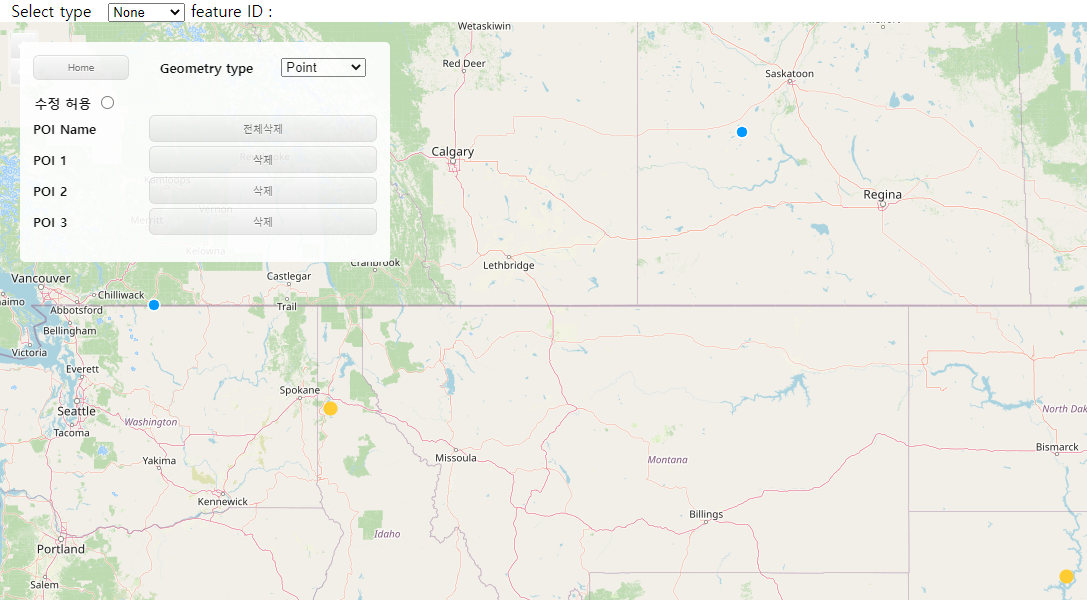
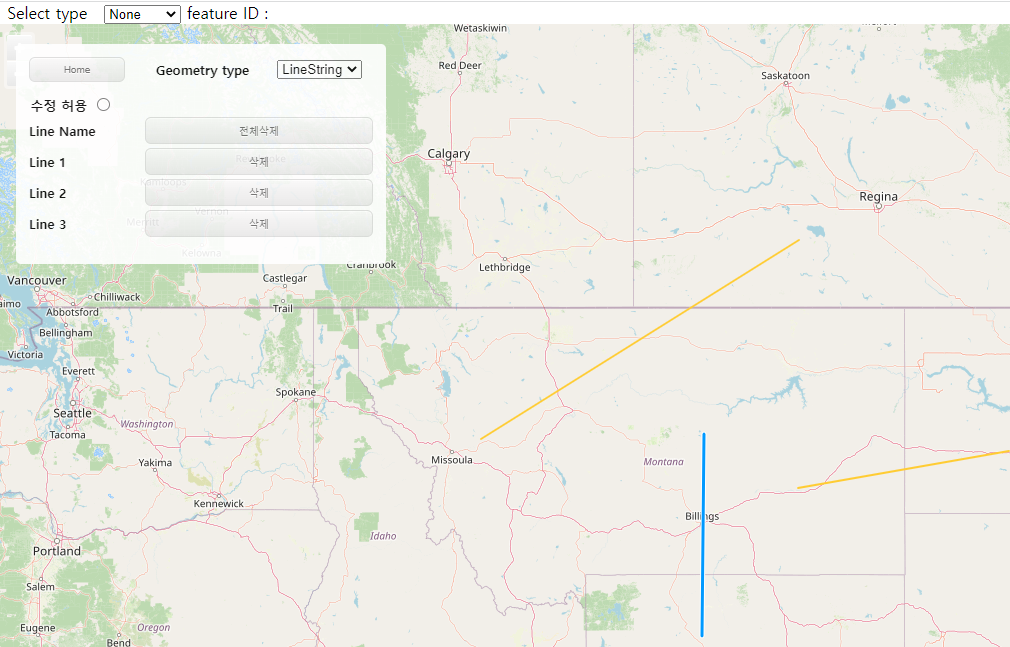
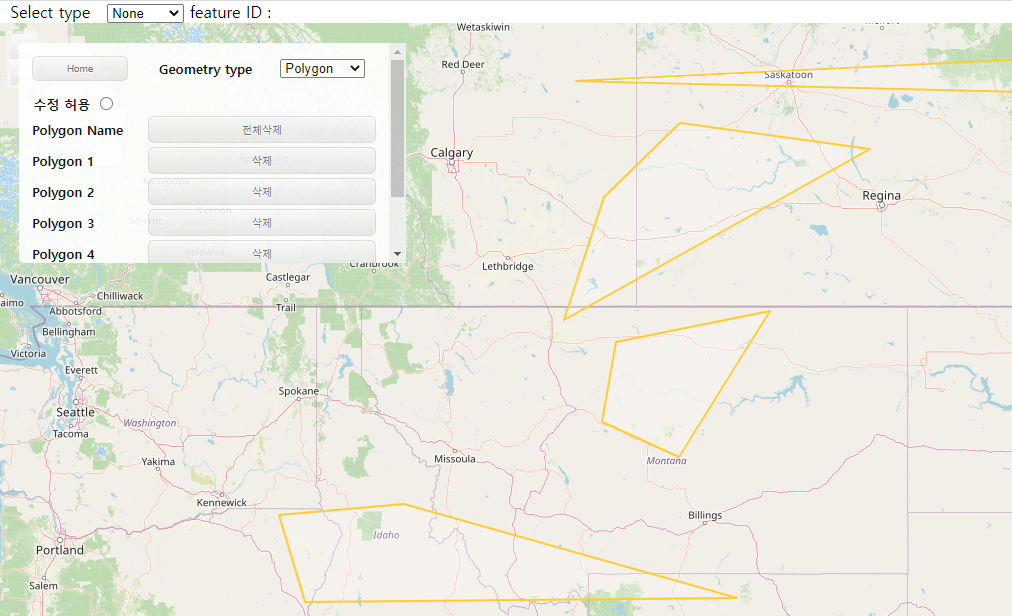
- 지도 로딩
- 지도위에 포인트, 라인, 폴리곤 (타입별)생성
- 생성시 리스트 출력 / 삭제시 리스트 삭제
- 스크롤 적용
- 생성된 객체별 자동 ID 부여
- 객체 선택
- 객체 선택시 상단에 객체정보 조회
- 객체 선택 옵션 변경 가능 (Click / Hover / Alt + Click)
- 객체 수정 / 삭제


브이월드를 OpenLayers 지도와 연동하여 주소 검색 기능 구현하기
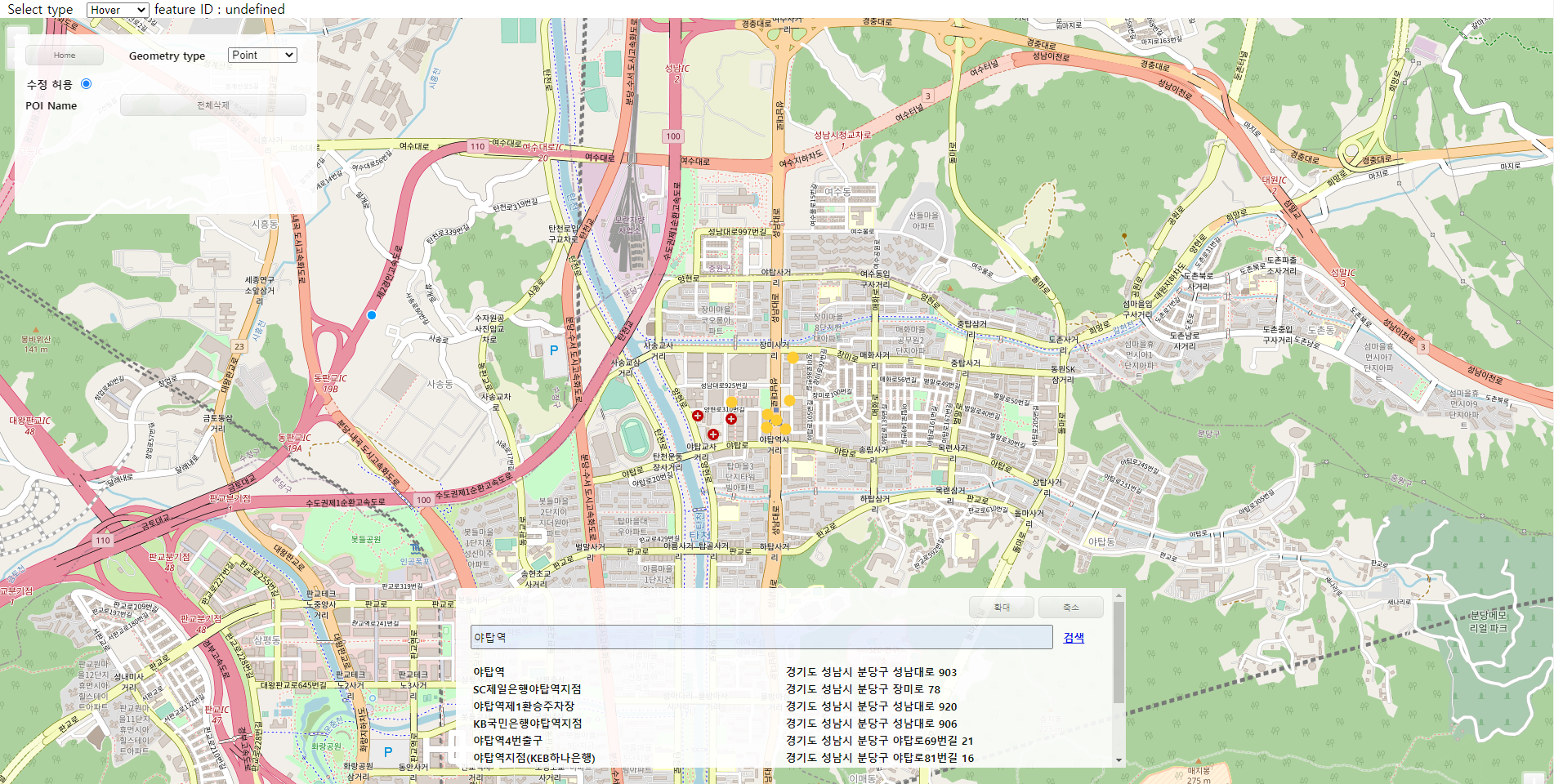
- 키워드 검색시 해당 주소명 / 도로명 주소 등 조회 가능
- 검색 결과 위치에 포인트 생성
- 리스트 클릭시 해당 위치로 이동
- 포인트 선택시 해당 장소명 표시
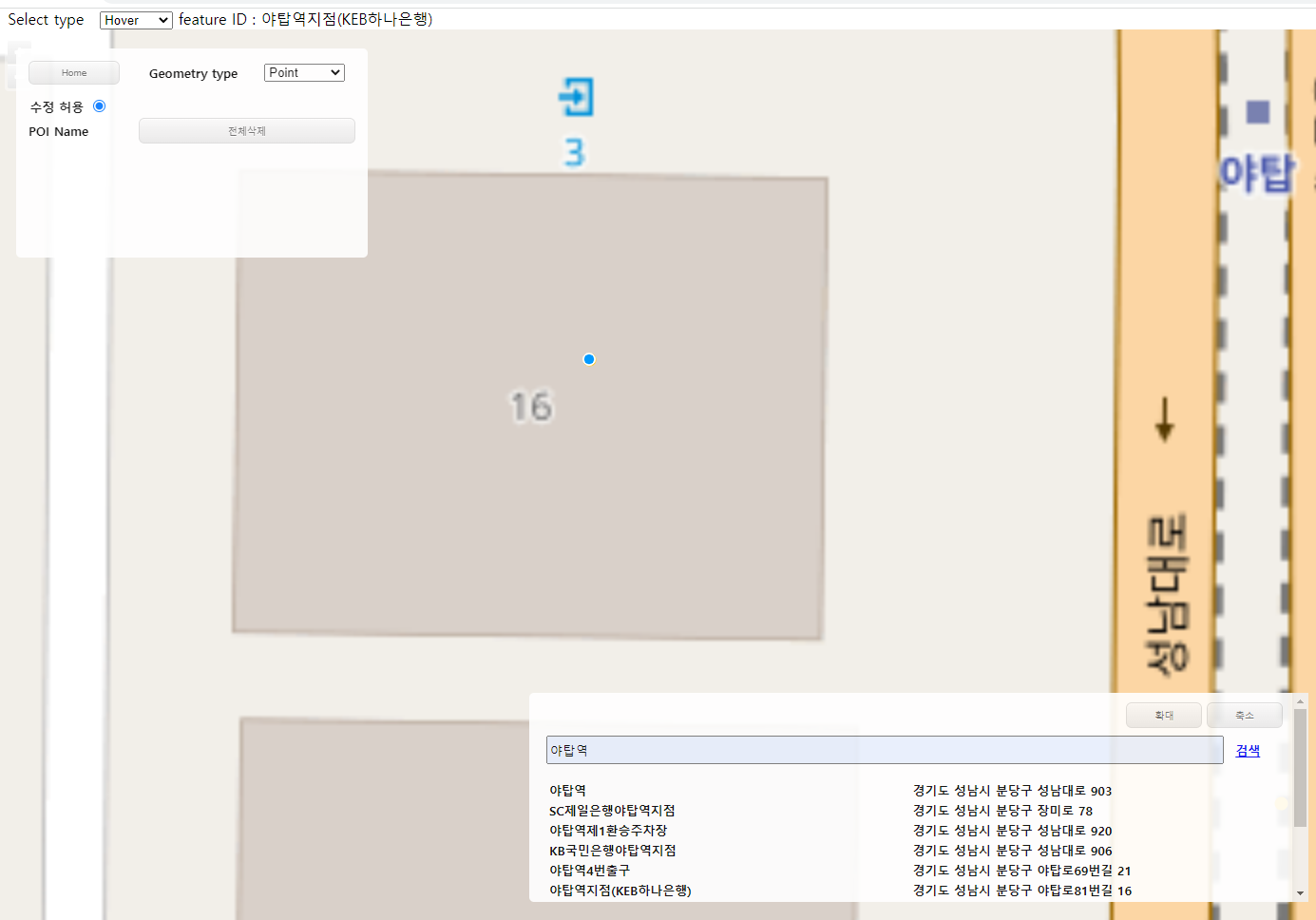
소스코드
openlayers.jsp
<%@ page language="java" contentType="text/html; charset=UTF-8"
pageEncoding="UTF-8"%>
<!DOCTYPE html>
<html>
<head>
<meta charset="UTF-8">
<!-- CSS -->
<link rel="stylesheet" href="resources/css/openlayers.css">
<link rel="stylesheet" href="https://openlayers.org/en/v4.6.5/css/ol.css" type="text/css">
<!-- favicon.ico -->
<link rel="shortcut icon" href="#">
<!-- The line below is only needed for old environments like Internet Explorer and Android 4.x -->
<script src="https://cdn.polyfill.io/v2/polyfill.min.js?features=requestAnimationFrame,Element.prototype.classList,URL"></script>
<script src="https://openlayers.org/en/v4.6.5/build/ol.js"></script>
<script src="https://ajax.googleapis.com/ajax/libs/jquery/3.4.1/jquery.min.js"></script>
<script src="https://cdnjs.cloudflare.com/ajax/libs/paginationjs/2.1.4/pagination.min.js"></script>
<link rel="stylesheet" href="https://cdnjs.cloudflare.com/ajax/libs/paginationjs/2.1.4/pagination.css"/>
<title>OpenLayers</title>
<style> html, body {height: 100%; padding: 0; margin: 0; } #map { height: 100%; width: 100%;} </style>
</head>
<body>
<!-- Search place and show lists -->
<div id="vwInterface">
<div id="vwBtn">
<button class="vwBtn" onclick="vwMaximize()">확대</button>
<button class="vwBtn" onclick="vwMinimize()">축소</button>
</div>
<form id="searchForm" action="#" class="form_data" onsubmit="return false;search();">
<input type="hidden" name="page" value="1" />
<input type="hidden" name="type" value="PLACE" />
<input type="hidden" name="request" value="search" />
<input type="hidden" name="apiKey" value="F9456F32-95A9-3CAD-8364-926B6B613A6A" />
<input type="hidden" name="domain" value="http://localhost:8080" />
<input type="hidden" name="crs" value="EPSG:3857" />
<div>
<input type="text" id="searchValue" name="query" value="" placeholder="장소를 입력해주세요" style="width: 90%;" /> <a href="javascript:vwSrch();" >검색</a>
</div>
</form>
<table id=vwTable></table>
<div class="pagination">
<section>
<div id="data-container"></div>
<div id="pagination"></div>
</section>
</div>
</div>
<!-- OpenLayers Map -->
<div id="map" class="map">
<!-- Select Interactions -->
<div id="selectOpt">
<form class="form-inline">
<label> Select type </label>
<select id="type" class="form-control">
<option value="singleclick" selected>None</option>
<option value="click">Click</option>
<option value="pointermove">Hover</option>
<option value="altclick">Alt+Click</option>
</select>
<span id="status">feature ID : </span>
</form>
</div>
<!-- Draw and Modify Interactions -->
<div id="interface">
<table id="menuTable" style="width: 350px;">
<thead>
<tr>
<th>
<button id="homeBtn" onclick="goHome();">Home</button>
</th>
<th>
<label> Geometry type</label>
</th>
<th>
<form class="form-inline">
<select id="olObjType">
<option value="Point">Point</option>
<option value="LineString">LineString</option>
<option value="Polygon">Polygon</option>
</select>
</form>
</th>
</tr>
</thead>
</table>
<!-- Tab content -->
<div id="updtTab">
<span> 수정 허용</span>
<input type="radio" name="updtBtn" onclick="updtOl()">
</div>
<div id="POI" class="tabcontent">
<table class="tabTable" id="olPOITable" style="width: 350px;">
<tr>
<td>POI Name</td>
<td colspan="2"><button onclick="emptyOl(1);">전체삭제</button></td>
</tr>
</table>
</div>
<div id="Line" class="tabcontent">
<table class="tabTable" id="olLineTable" style="width: 350px;">
<tr>
<td>Line Name</td>
<td colspan="2"><button onclick="emptyOl(2);">전체삭제</button></td>
</tr>
</table>
</div>
<div id="Polygon" class="tabcontent">
<table class="tabTable" id="olPynTable" style="width: 350px;">
<tr>
<td>Polygon Name</td>
<td colspan="2"><button onclick="emptyOl(3);">전체삭제</button></td>
</tr>
</table>
</div>
</div>
</div>
<!-- JS File -->
<script src="resources/js/page.js"></script>
<script src="resources/js/ol/main.js"></script>
<script src="resources/js/ol/main-list.js"></script>
<script src="resources/js/ol/olObj.js"></script>
<!-- Pointer events polyfill for old browsers, see https://caniuse.com/#feat=pointer -->
<script src="https://cdn.jsdelivr.net/npm/elm-pep@1.0.6/dist/elm-pep.js"></script>
</body>
</html>
main.js
// variable settings for initial load
var source = new ol.source.Vector();
var vector = new ol.layer.Vector({		//vector settings for object selection
  source: source,
  style: new ol.style.Style({
    fill: new ol.style.Fill({
      color: 'rgba(255, 255, 255, 0.2)'
    }),
    stroke: new ol.style.Stroke({
      color: '#ffcc33',
      width: 2
    }),
    image: new ol.style.Circle({
      radius: 7,
      fill: new ol.style.Fill({
        color: '#ffcc33'
      })
    })
  })
});

var raster = new ol.layer.Tile({
    source: new ol.source.OSM()
});

var map = new ol.Map({
  layers: [raster, vector],
  target: 'map',
  view: new ol.View({
    center: [-11000000, 4600000],
    zoom: 4
  })
});

var draw, snap; // global so we can remove them later
var typeSelect = document.getElementById('olObjType');	// geometry type

var modify = new ol.interaction.Modify({source: source});	// variable for modify


/**
 * variables for select features
 */
var select = null;  // refer to currently selected interaction
var selectSingleClick = new ol.interaction.Select({});	// select interaction working on "single click"
var selectClick = new ol.interaction.Select({	// select interaction working on "click"
  condition: ol.events.condition.click,
  filter : function(feature, layer){
	  document.getElementById('status').innerHTML = 'feature ID : ' + feature.getId();
  }
});
var selectPointerMove = new ol.interaction.Select({		// select interaction working on "pointer move"
  condition: ol.events.condition.pointerMove,
  filter : function(feature, layer){
	  document.getElementById('status').innerHTML = 'feature ID : ' + feature.getId();
  }
});
var selectAltClick = new ol.interaction.Select({	// select interaction working on "alt click"
  condition: function(mapBrowserEvent) {
    return ol.events.condition.click(mapBrowserEvent) &&
        ol.events.condition.altKeyOnly(mapBrowserEvent);
  },
  filter : function(feature, layer){
	  document.getElementById('status').innerHTML = 'feature ID : ' + feature.getId();
  }
});

var selectElement = document.getElementById('type');	// select type options

/**
 * change select type
 */
var changeInteraction = function() {
  if (select !== null) {
    map.removeInteraction(select);
  }
  var value = selectElement.value;
  if (value == 'singleclick') {
    select = selectSingleClick;
  } else if (value == 'click') {
    select = selectClick;
  } else if (value == 'pointermove') {
    select = selectPointerMove;
  } else if (value == 'altclick') {
    select = selectAltClick;
  } else {
    select = null;
  }
  if (select !== null) {
    map.addInteraction(select);
    select.on('select', function(e) {

    });
  }
};


/**
 * onchange callback on the select element
 */
selectElement.onchange = changeInteraction;
changeInteraction();


/**
 * Change select box's value so draw method can activate
 */
$(function(){
	$('#olObjType').change();
})

/**
 * Add draw type instance
 */
function addInteractions() {
  draw = new ol.interaction.Draw({
    source: source,
    type: typeSelect.value
  });
  map.addInteraction(draw);
  snap = new ol.interaction.Snap({source: source});		// draw and modify together
  map.addInteraction(snap);
}

/**
 * Handle change event
 */
typeSelect.onchange = function() {

	// tab menu change
	if(typeSelect.value == "Point") {
		  olCtgry(event, 'POI');
	  } else if(typeSelect.value == "LineString") {
		  olCtgry(event, 'Line');
	  } else if(typeSelect.value == "Polygon") {
		  olCtgry(event, 'Polygon');
	  } else {
		  alert('ERROR Occurred')
	  }

	// remove and add interaction on map
	map.removeInteraction(draw);
	map.removeInteraction(snap);
	addInteractions();

	// add list when draw ends
	draw.on('drawend', function (e) {
		if(typeSelect.value == "Point") {
			createOlPOI();
			OLPOICOUNT++;
			var POIID = OLPOICOUNT-1;
			e.feature.setId('POINT_' + POIID);
		} else if(typeSelect.value == "LineString") {
			createOlLine();
			OLLINECOUNT++;
			var LINEID = OLLINECOUNT-1;
			e.feature.setId('LINE_' + LINEID);
		} else if(typeSelect.value == "Polygon") {
			createOlPyn();
			OLPYNCOUNT++;
			var PYNID = OLPYNCOUNT-1;
			e.feature.setId('POLYGON_' + PYNID);
		} else {
			alert('ERROR Occurred')
		}
	});
};


// Add draw type instance for real
addInteractions();
olObj.js
// create object
var OLPOICOUNT = 1;
var OLLINECOUNT = 1;
var OLPYNCOUNT = 1;

function createOlPOI() {
	$('#olPOITable').append('<tr class="olPOIList" id="' + OLPOICOUNT + '">'
    		+ '<td><span> POI ' + OLPOICOUNT + '</span></td>'
    		+ '<td colspan="2"><button onclick="rmvOl(this, 1)">삭제</button></td>'
    		+ '</tr>');
}

function createOlLine() {
	$('#olLineTable').append('<tr class="olLineList" id="' + OLLINECOUNT + '">'
    		+ '<td><span> Line ' + OLLINECOUNT + '</span></td>'
    		+ '<td colspan="2"><button onclick="rmvOl(this, 2)">삭제</button></td>'
    		+ '</tr>');
}

function createOlPyn() {
	$('#olPynTable').append('<tr class="olPynList" id="' + OLPYNCOUNT + '">'
    		+ '<td><span> Polygon ' + OLPYNCOUNT + '</span></td>'
    		+ '<td colspan="2"><button onclick="rmvOl(this, 3)">삭제</button></td>'
    		+ '</tr>');
}


/**
 * empty all objects
 * @param olType
 */
function emptyOl(olType) {

	alert('empty all');

	// empty lists
	if(olType == 1) {
		$('.olPOIList').remove();
	} else if(olType == 2) {
		$('.olLineList').remove();
	} else if(olType == 3) {
		$('.olPynList').remove();
	} else {

	}

	// empty features
	var features = vector.getSource().getFeatures();
	features.forEach((feature) => {
		vector.getSource().removeFeature(feature);
	});
};


/**
 * Remove objects (POI, Line, Polygon)
 * @param olObj
 * @param olId
 */
function rmvOl(olObj, olId) {

	// common variable
	var id = olObj.parentElement.parentElement.id;
	var imgId = parseInt(id) + 1;

	// remove lists and features
	if(olId == 1) {
		$('.olPOIList').remove('#' + id);
		var features = vector.getSource().getFeatureById('POINT_' + id);
	} else if(olId == 2) {
		$('.olLineList').remove('#' + id);
		var features = vector.getSource().getFeatureById('LINE_' + id);
	} else if(olId == 3) {
		$('.olPynList').remove('#' + id);
		var features = vector.getSource().getFeatureById('POLYGON_' + id);
	} else {

	}
	vector.getSource().removeFeature(features);

}


/**
 * update OpenLayers so it can be modified
 */
function updtOl() {
	map.addInteraction(modify);
}
page.js
// Move page
function goHome() {
	location.replace('/mymap');
}
function goXdworld() {
	location.href="xdworld.do";
}
function goOpenLayers() {
	location.href="openlayers.do";
}


// Open XDWORLD's category
function xdwCtgry(ctgry, id) {

	// initialize
	move();
	setMouseState(1);

	// open category
	cmmnCtgry(ctgry, id);

	// layerList (POI, Line, Polygon)
	var layerList = new Module.JSLayerList(true);
	var layer = layerList.createLayer("POI_TEST", Module.ELT_3DPOINT);
	let lineLayer = layerList.nameAtLayer("Line_Option");
	var pynLayer = layerList.nameAtLayer("POLYGON_LAYER");
	if (pynLayer == null) {
		pynLayer = layerList.createLayer("POLYGON_LAYER", Module.ELT_POLYHEDRON);
	}

	// layer visible settings (POI, Line, Polygon)
	if(id == "POI") {

		layer.setVisible(true);
		if(lineLayer != null) {
			lineLayer.setVisible(false);
		}
		pynLayer.setVisible(false);

	} else if(id == "Line") {

		layer.setVisible(false);
		if(lineLayer != null) {
			lineLayer.setVisible(true);
		}
		pynLayer.setVisible(false);

	} else if(id == "Polygon") {

		layer.setVisible(false);
		if(lineLayer != null) {
			lineLayer.setVisible(false);
		}
		pynLayer.setVisible(true);

	} else {
		alert('ERROR Occurred')
	}

}


// Open OpenLayers' category
function olCtgry(ctgry, id) {
	// empty all objects and lists before changing category
	var features = vector.getSource().getFeatures();
	features.forEach((feature) => {
		vector.getSource().removeFeature(feature);
	});

	$('.olPOIList').remove();
	$('.olLineList').remove();
	$('.olPynList').remove();

	cmmnCtgry(ctgry, id);

}


/**
 * Open category method for both XDWORLD and OpenLayers
 * @param ctgry		// event
 * @param id		// POI, line, polygon
 */
function cmmnCtgry(ctgry, id) {

	// change tab menu
	var i, tabcontent, tablinks;

	tabcontent = document.getElementsByClassName("tabcontent");
	for (i = 0; i < tabcontent.length; i++) {
	  tabcontent[i].style.display = "none";
	}

	tablinks = document.getElementsByClassName("tablinks");
	for (i = 0; i < tablinks.length; i++) {
	  tablinks[i].className = tablinks[i].className.replace(" active", "");
	}

	document.getElementById(id).style.display = "block";

	try {
		ctgry.currentTarget.className += " active";
	} catch (e) {
		// TODO: handle exception
	}

}


/**
 * VWORLD results paginations
 * @param data		// data from vwSrch of main-list.js
 */
function vwPaging(data) {
    let container = $('#pagination');
    container.pagination({
    	dataSource: [
    		data.response.result.items
        ],
        callback: function (data, pagination) {
            var dataHtml = '';

            for(var i=1; i <= data[0].length-1; i++) {
	            $.each(data, function (index, item) {
	                dataHtml += '<tr><td><span class="vwList" onclick="goVwPlace('	// call function that can go to place
	                    + data[0][i].point.x*1 + ','
	                    + data[0][i].point.y*1 + ');">'
	                    + data[0][i].title + '</span></td>'	// show place lists in Table
	                    + '<td><span>' + data[0][i].address.road + '</span></td></tr>';
	            });
            }

            dataHtml += '';

            $("#vwTable").html(dataHtml);
        }
    })
}
main-list.js
var vwSrch = function(){
		$.ajax({
			type: "get",
			url: "http://api.vworld.kr/req/search",
			data : $('#searchForm').serialize(),
			dataType: 'jsonp',
			async: false,
			success: function(data) {
				$('#vwTable').empty();
				if(data.response.status =="NOT_FOUND"){
					alert("검색결과가 없습니다.");
				}else{
					for(var o in data.response.result.items){
						if(o==0){
			move(data.response.result.items[o].point.x*1,data.response.result.items[o].point.y*1);
						} else {
							addVwMarker(data.response.result.items[o].point.x*1, data.response.result.items[o].point.y*1, data.response.result.items[o].title);
							vwPaging(data);
						}
					}
				}
			},
			error: function(xhr, stat, err) {}
		});
	}

	var move = function(x,y){
		map.getView().setCenter([ x, y ]); // move map
		map.getView().setZoom(15); // set zoom level
	}


/**
 * move to place when click list
 * @param x
 * @param y
 */
function goVwPlace(x,y) {
	map.getView().setCenter([ x, y ]); // move map
	map.getView().setZoom(20); // set zoom level
}


/**
 * maximize and minimize table
 */
function vwMaximize() {
	$('#vwInterface').css({
		margin: '45rem 0rem 0rem 35rem',
		height: '200px',
		width: '50rem'
	});
}
function vwMinimize() {
	$('#vwInterface').css({
		margin: '5rem 0rem 0rem 95rem',
		height: '4rem',
		width: '20rem'
	});
}


/**
 * add marker when search success
 * @param x
 * @param y
 * @param name
 */
function addVwMarker(x,y,name) {

    const point = new ol.Feature({		// make feature
        geometry: new ol.geom.Point([x,y]),		// set position
    })
    point.setId(name);
    vector.getSource().addFeature(point);	//add feature to data source

}


/**
 * Enter key function
 * @param e
 */
$(document).keyup(function(e) {
	let code = e.keyCode || e.which;
	if ($('#searchForm:focus') && (e.key=='Enter') || code==13) {   // focus and enter key
	   vwSrch();
	}
});
openlayers.css
@charset "UTF-8";

td {
	width: 7rem;
}

button {
	box-shadow:inset 0px 1px 0px 0px #ffffff;
	background:linear-gradient(to bottom, #f9f9f9 5%, #e9e9e9 100%);
	background-color:#f9f9f9;
	border-radius:6px;
	border:1px solid #dcdcdc;
	display:inline-block;
	cursor:pointer;
	color:#666666;
	font-size:10px;
	padding:6px 24px;
	text-decoration:none;
	text-shadow:0px 1px 0px #ffffff;
	width: -webkit-fill-available;
}

button:hover {
	background:linear-gradient(to bottom, #e9e9e9 5%, #f9f9f9 100%);
	background-color:#e9e9e9;
}
button:active {
	position:relative;
	top:1px;
}

.tablinks {
	box-shadow:inset 0px 1px 0px 0px #ffffff;
	background:linear-gradient(to bottom, #ededed 5%, #dfdfdf 100%);
	background-color:#ededed;
	border-radius:6px;
	border:1px solid #dcdcdc;
	display:inline-block;
	cursor:pointer;
	color:#777777;
	font-family:Arial;
	font-size:15px;
	font-weight:bold;
	padding:6px 24px;
	text-decoration:none;
	text-shadow:0px 1px 0px #ffffff;
	width: -webkit-fill-available;
}
.tablinks:hover {
	background:linear-gradient(to bottom, #dfdfdf 5%, #ededed 100%);
	background-color:#dfdfdf;
}
.tablinks:active {
	position:relative;
	top:1px;
}

.mapLoad {
	position: absolute;
	top: 50%;
	left: 43.3%;
}

.map 	{
			width: 100%;
			height: 400px;
      	}

a.skiplink {
			position: absolute;
			clip: rect(1px, 1px, 1px, 1px);
			padding: 0;
			border: 0;
			height: 1px;
			width: 1px;
			overflow: hidden;
		}
a.skiplink:focus {
			clip: auto;
			height: auto;
			width: auto;
			background-color: #fff;
			padding: 0.3em;
		}

.tabcontent {
  			display: none;
		}

.vwList:hover {
	cursor: pointer;
}

.vwBtn {
	width: 5rem;
}

#pagination {
    margin-left: 42.5%;
}

#map:focus {
			outline: #4A74A8 solid 0.15em;
		}

#interface {
			display: block;
			position: absolute;
			z-index: 9;
			background-color: #FFFFFF;
			padding: 10px 10px 10px 10px;
			border-radius: 5px;
			font-size: 13px;
			font-weight: bold;
			opacity: 0.9;
			height:200px;
			overflow: auto;
			margin: 20px;
		}

#vwInterface {
			display: block;
			position: absolute;
			z-index: 9;
			background-color: #FFFFFF;
			padding: 10px 10px 10px 10px;
			border-radius: 5px;
			font-size: 13px;
			font-weight: bold;
			opacity: 0.9;
			height:200px;
			overflow: auto;
			margin: 45rem 0rem 0rem 35rem;
			width: 50rem;
		}

#menuTable {
    padding-bottom: 10px;
}

#homeBtn 	{
	    	width: -webkit-fill-available;
}

#vwTable {
    width: -webkit-fill-available;
    margin: 0.5rem;
}

#searchValue {
    width: 95%;
    height: 1.5rem;
    margin: 0.5rem;
}

#vwBtn {
	text-align: end;
}
728x90
'GIS Project' 카테고리의 다른 글
| JIRA 사용 후기 (0) | 2024.02.26 |
|---|---|
| 3차원 실내공간정보 구축 과정 (1) | 2023.11.26 |
| 공간정보관리 플랫폼 만들기 (기능 소개) (0) | 2023.11.22 |